Table of contents:
Welcome, digital artists! In this guide, we'll cover everything you need to know about Midjourney subscription plans - no fluff, just the numbers and insights to help you choose the right plan. You'll learn how to get free image generations and have all the information needed to pick a perfect subscription plan for your needs.
Video guide "Midjourney Subscription Plans Explained - Complete 2026 Guide"
General Info for Beginners
If you're new to Midjourney, here's what you should know first. Midjourney is a paid AI tool, though currently you can create images and even videos for free on meta.ai with certain limitations compared to the official website version. In order to use Midjourney in full scale and with the best possible user interface, you need to choose a subscription plan. With any paid plan, you can use your generated images for nearly any purpose, including commercial use.
You can find the subscription plans in your profile under the "Manage subscription" section. The comparison table shows all available plans with prices for both monthly and yearly billing. Note that VAT will be added upon checkout. Here’s some additional info on subscription plans.
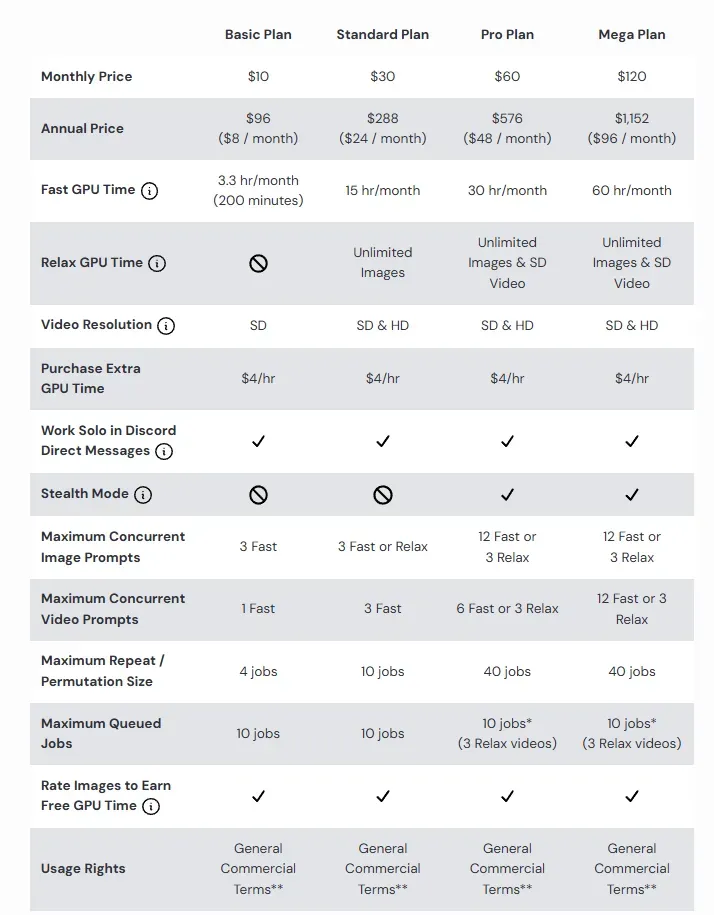
Midjourney Subscription Plans Overview
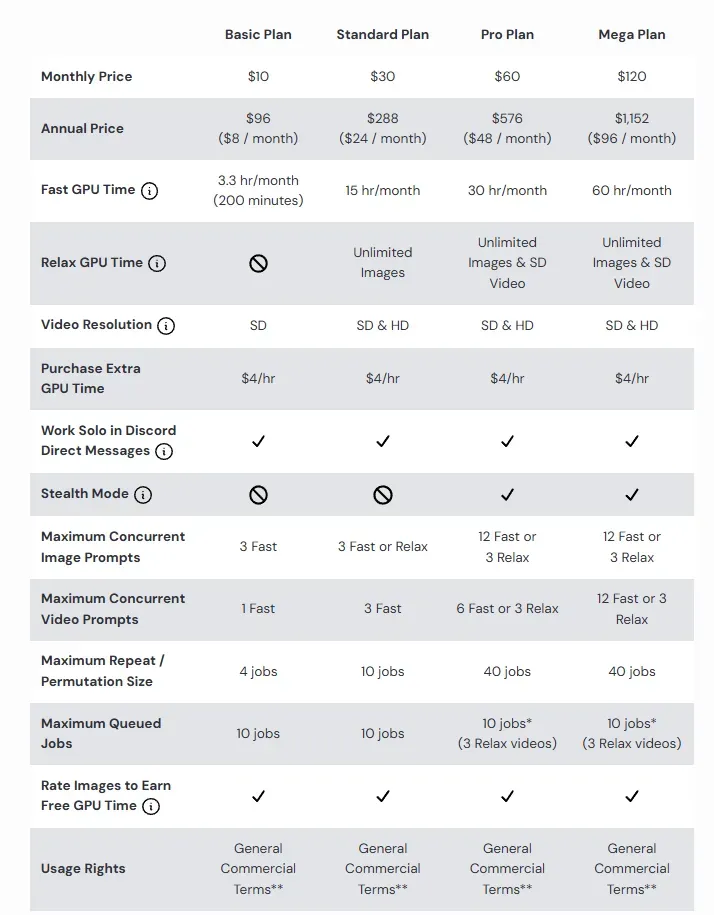
Understanding GPU Time
The key thing to understand is GPU time - each plan includes a specific number of GPU hours (hours of fast generations). Here's what you can create with GPU time:
- Processing one standard image prompt (a grid of 4 images) usually takes about 1 minute of GPU time
- An SD video (batch size 4) takes around 8 minutes
- An HD video (batch size 4) takes about 26 minutes
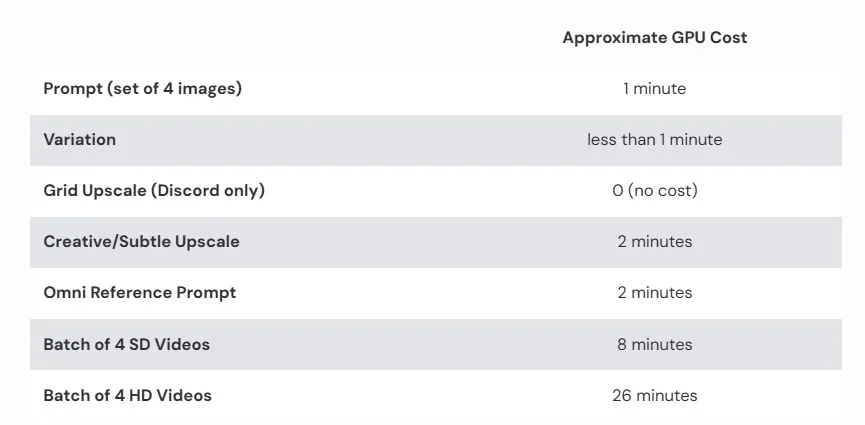
Standard GPU Costs
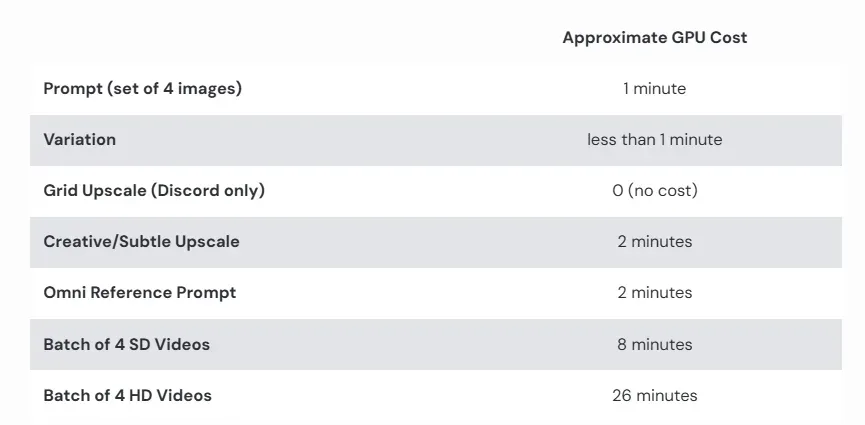
You can switch between SD and HD modes as well as the batch sizes (only for videos) in the prompt Settings of the Create tab on the official website. Other tasks may use more or less time. For example, upscaling images, using Omni Reference, non-standard aspect ratios, or older model versions take more GPU time. Creating variations or using lower-quality settings usually takes less.
Fast, Turbo, and Relax Modes
There are three generation modes available:
- Fast mode - the default setting; all numbers mentioned in this guide refer to Fast mode
- Turbo mode - up to 4 times faster than Fast mode but costs twice as much GPU time
- Relax mode - slow but doesn't use GPU time; offers unlimited image and SD video generations, but availability depends on your plan:
- Not available in the Basic plan
- Works for images in the Standard plan
- Works for images and SD videos in PRO and Mega plans
Keep in mind that "slow" really means slow - sometimes you'll wait up to 10 minutes for an image grid. Relax mode also has other limitations, like not supporting permutation prompts or the /repeat parameter.
Subscription Plans Explained
Here's a detailed cost overview per plan:
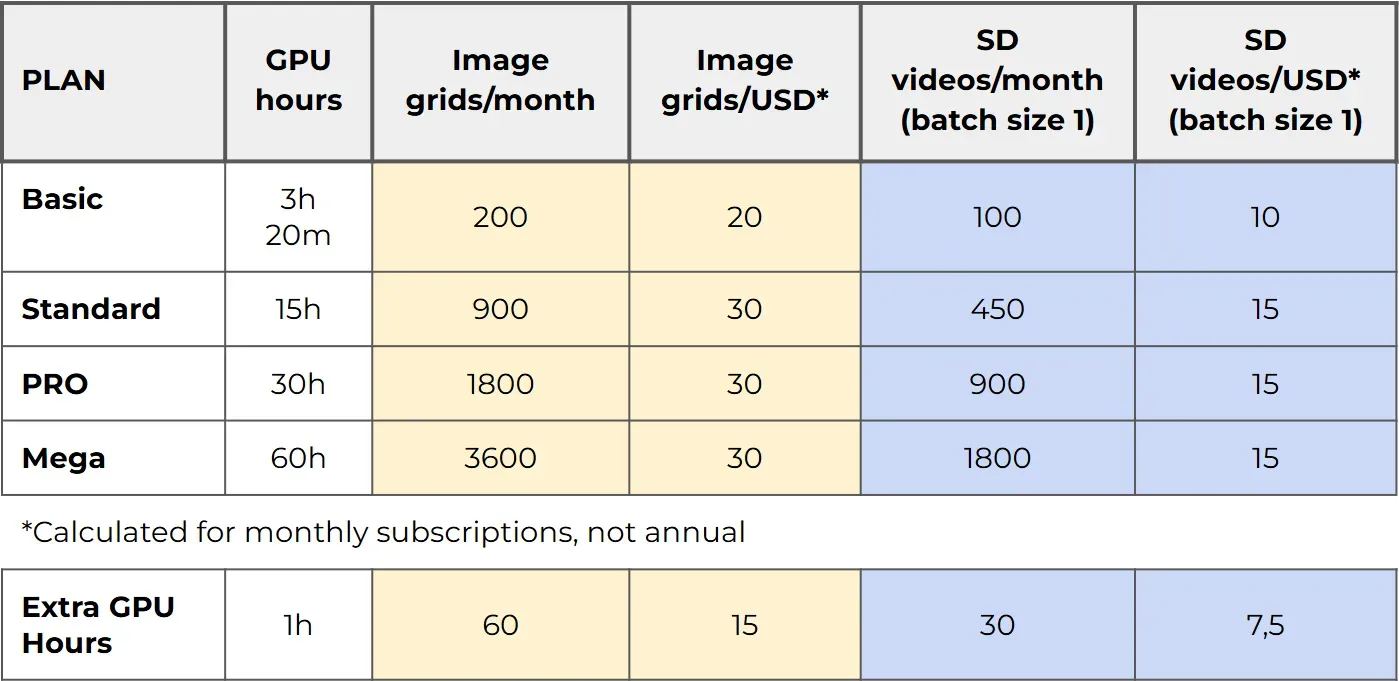
Detailed Comparison by number of outcomes: Basic, Standard, PRO, and Mega Plans
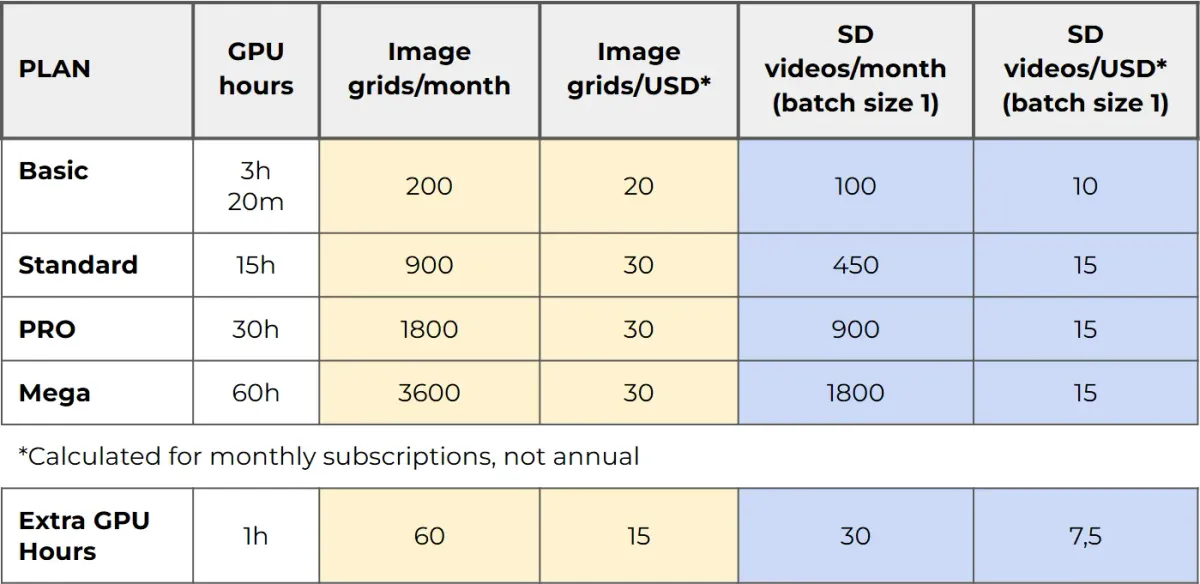
Key insights:
- The Basic plan has the highest cost per image while Standard, PRO, and Mega all have exactly the same cost per image/video
- Extra GPU hours (purchased for $4 each) have an even higher cost than the Basic plan - we don't recommend buying extra GPU time
- These calculations are for the most standard tasks, representing the maximum you can get
Important: Unused GPU time doesn't roll over to the next month - except for extra GPU hours you've purchased additionally (these are valid for 2 months). The best strategy is to use up all your included hours before the month ends.
Additional Features by Plan
Different plans offer varying features:
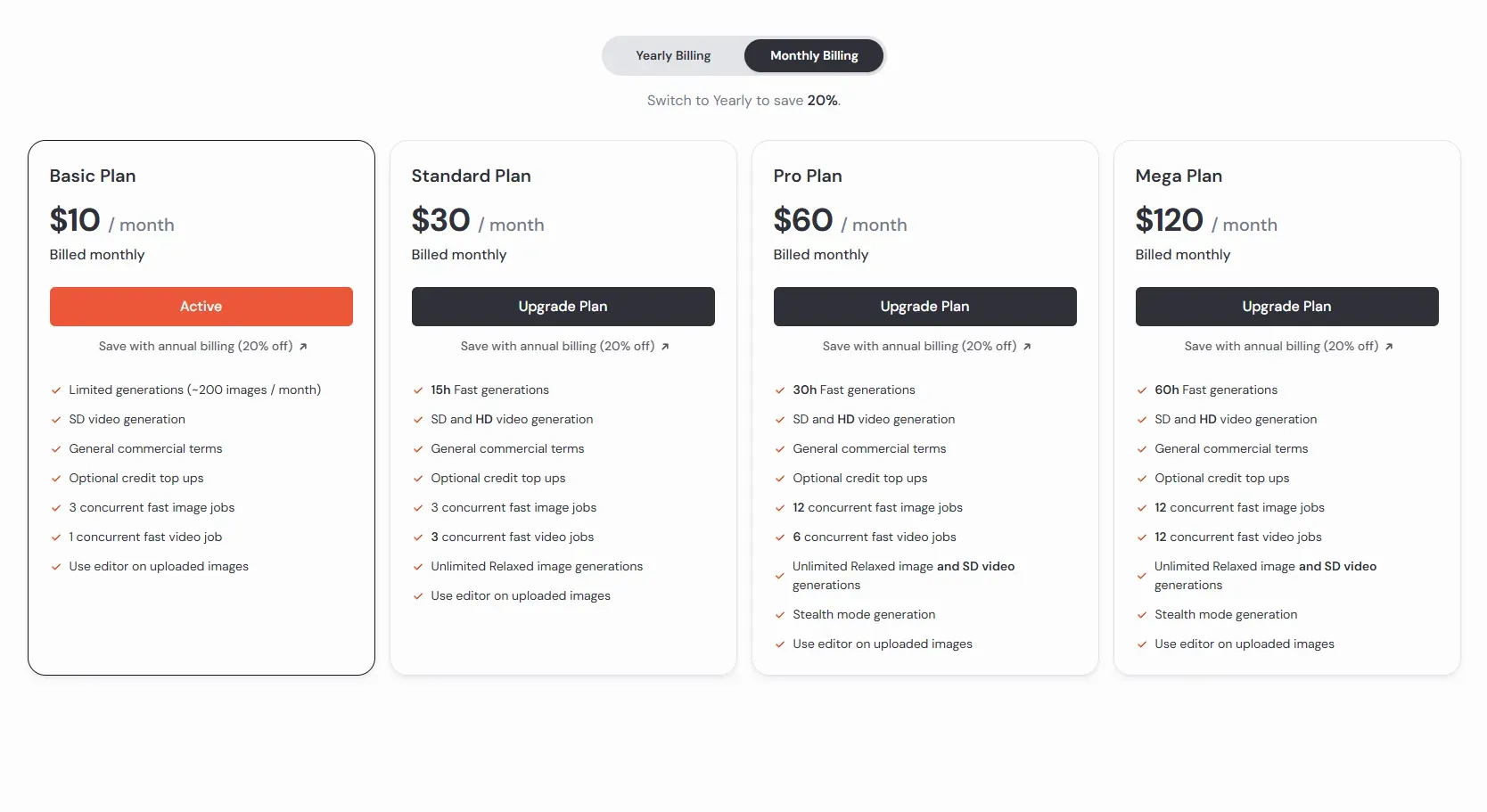
Feature Availability Across Plans
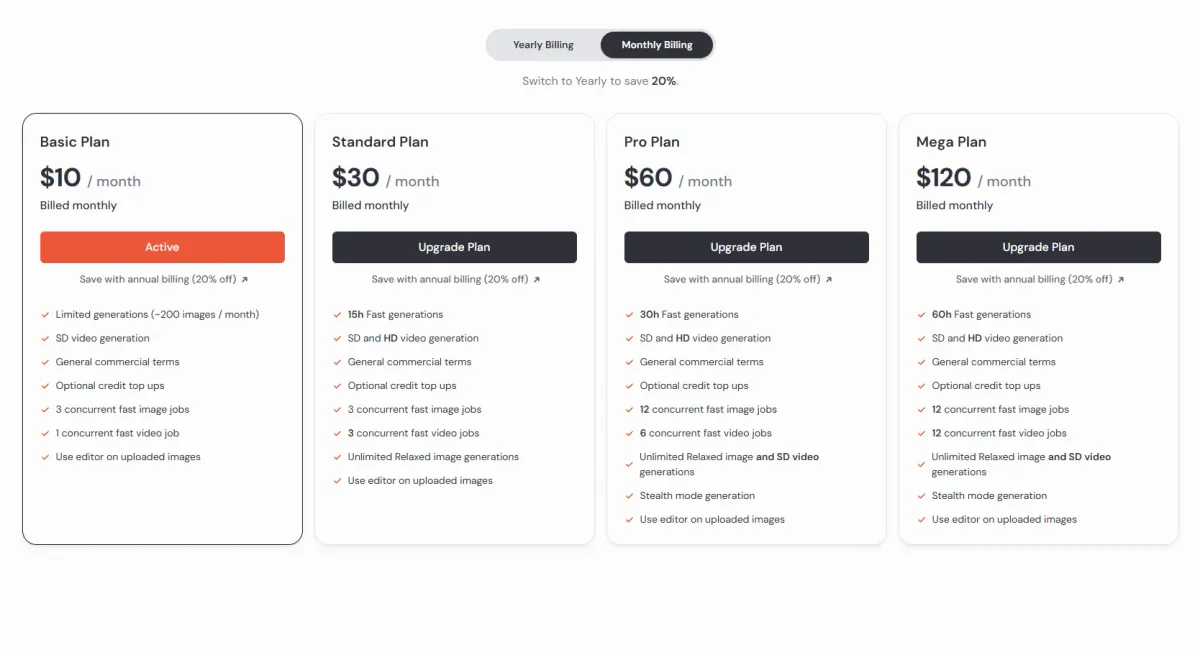
- HD videos - unavailable on the Basic plan
- Stealth mode (starting from PRO plan) - hides your creations from the public community gallery
- Concurrent jobs - lets you run multiple tasks simultaneously; great for working fast or using permutation prompts
- Optional credit top-ups - all plans allow you to buy extra GPU hours for $4/hour
- Midjourney Editor - available to everyone
How to Get Free Image Generations
You can earn bonus GPU time - but only if you already have a paid subscription.
- Ranking Tasks
Go to the Tasks tab on Midjourney's website. You can rank images, videos, styles, and other content here. If you're among the top 2,000 rankers in a chosen category, you'll get 1 free hour daily. Hours are awarded once per day, so there's a delay.
It usually takes around 50-100 rankings to qualify. Ranking takes about 5-10 minutes for 100 items, making it a quick way to earn extra GPU time. - Surveys
Surveys can give you 2 free GPU hours instantly after completion, but only once per account. New surveys appear occasionally, so check back regularly. - Also, keep an eye on the Updates tab - sometimes Midjourney announces temporary events or campaigns with bonus GPU rewards.
What Plan to Pick
For Beginners
If you're just testing Midjourney or not sure you'll stick with it, start with the Basic plan for one month. When you run out of GPU time, do ranking tasks to earn free generations.
If you struggle to write prompts, try our Prompt Builders - beginner-friendly Google Sheets tools with dropdowns that help you learn prompting, avoid wasting GPU time on blind experiments, and spark ideas.
Understanding Upgrades and Downgrades
Here's how plan changes work:
- Upgrading mid-month:
Let's say you start the Basic plan on January 1st (runs until February 1st). After 10 days, you've used up all your GPU time. You decide to upgrade to Standard. Midjourney gives you two options:- Option 1: Start the Standard plan from the new month (February 1st) - you're out until then or rely on awarded hours from Tasks
- Option 2: Start it right now for the full price of the Standard plan - your subscription period updates to end on February 10th
- You cannot upgrade until the end of the current month for a prorated cost.
- Downgrading:
You can't downgrade mid-month. For example, if you start with the Standard plan on January 1st and run out of GPU time by January 23rd, you can't switch down to Basic until February 1st.
For Regular Users
Choose based on your workload:
- Standard plan - best for testing, experiments, and moderate use; includes Relax mode for images (as your Option 3 till the subscription period ends)
- PRO or Mega plans - ideal for content creators producing large volumes of AI art for sale or educational content; includes Relax mode for both images and SD videos
About Yearly Subscriptions
Yearly subscriptions offer about a 20% discount, but consider these disadvantages:
- Unused GPU hours don't roll over to the next month - even for yearly subscribers
- Large one-time payment required, and Midjourney is already one of the most expensive tools in its category
- Limited flexibility - no upgrading or downgrading of plans mid-year
- Attachment to Midjourney - a year in AI is an eternity; new tools appear constantly, and your needs might change. You might want to experiment with other AIs or even switch to a different platform entirely. If that happens, the rest of your prepaid year simply goes to waste.
Flexible Approach (Recommended)
A practical strategy is to plan your workload monthly and switch between plans as needed:
- Standard plan - when developing new projects; use Relax mode or ranking tasks if you run out of GPU hours
- Basic plan - when focusing on other tools, marketing, or smaller projects
- No subscription - during vacations or breaks
- PRO plan - once or twice a year when major updates or new features are released
This flexible approach costs around $200-250 USD per year + VAT while providing maximum adaptability. You can upgrade to PRO for a creative burst and downgrade later when you don't need that much GPU power.
With an annual subscription, you lose this flexibility - you can't upgrade for one month, so you're stuck either waiting for slow Relax mode, grinding daily ranking tasks, or buying overpriced extra GPU hours.
Summary
Here are the key takeaways about Midjourney subscription plans:
- Midjourney offers four paid plans: Basic, Standard, PRO, and Mega - all include commercial usage rights
- Image and SD video generation are available on all plans
- All users can access the Midjourney Editor
- HD video generation starts from the Standard plan
- Relax mode (unlimited generations) is available for images starting from Standard, and for SD videos starting from PRO; there's no Relax mode for HD videos at all
- You can earn free GPU time through ranking tasks and surveys (requires paid subscription)
- Monthly subscriptions offer more flexibility than yearly plans
- You can try Midjourney for free on Meta.ai
Happy creating!